Quick start
This page takes you from a flashed unit to a take you keep. It is written for the Analog Rytm MKII; on the Syntakt the steps are the same, with the differences on its page. It assumes Trig Seedr is on the unit: if not, see Flashing a Rytm MKII or a Syntakt, or try it first in the emulator. Trig Seedr is a beta: work on a project you have backed up (what beta means).
1. Check the version
Section titled “1. Check the version”While the unit starts, the boot screen shows the version: TS08 for 0.8.0.
2. Open Trig Seedr on an empty track
Section titled “2. Open Trig Seedr on an empty track”- Load a scratch pattern, and select a track with no trigs on it, for example BD (not the FX track).
- Press TRIG three times: stock’s TRIG page, then EUCLIDEAN, then Trig Seedr. (TRIG held + PAGE opens it from anywhere.)
- Press RIGHT until the title bar says RHYTHM. An empty track starts on SRC = RAND: random trigs on a grid.
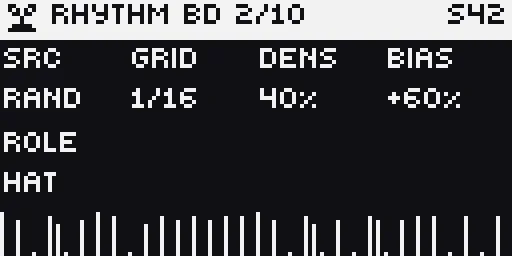
The strip at the bottom is the preview: the take YES would write, one bar per step, its height the velocity. Turn DENS (knob C) and watch it fill and empty. Nothing is written yet.
3. Generate: YES
Section titled “3. Generate: YES”- Press RECORD so it is lit (grid recording; not RECORD + PLAY).
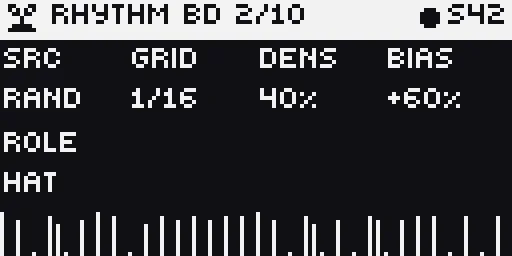
- Press PLAY, then YES. The take is written and plays. A dot before the seed in the title bar
(
● S1) says the take is not applied yet. - YES again: the next seed, a new take. Your original track is kept underneath; each YES starts from it.
- Turn a knob, for example BIAS (knob D) to +60 %, and press YES: the same seed with your change.
4. Shape it on the other pages
Section titled “4. Shape it on the other pages”LEFT / RIGHT move between the pages. Try:
- DYNAMICS: turn VEL up (a velocity range), set SHAPE to STRONG and AMT to 80 %: the beats get louder. Turn ACC for accents.
- TRIG: turn COND to 25 %: a quarter of the trigs get a probability condition.
- TIME: choose a groove with GRV.
Each change shows on the strip at once; YES writes it. A page left at 0 writes nothing.
5. Apply: FUNC + YES
Section titled “5. Apply: FUNC + YES”When you like what plays, press FUNC + YES. The strip says APPLIED and the dot goes: the take is now the track’s. Save the project as usual.
If you do not apply, the original comes back: NO does it at once, and so does changing track or pattern, closing Trig Seedr or turning RECORD off (NOT APPLIED). Nothing else is lost: YES then brings the take you were hearing back.
6. On a track that has trigs
Section titled “6. On a track that has trigs”A track with trigs starts on SRC = TRACK: its own trigs, which the other pages dress. With every page at 0, YES changes nothing. Turn DYNAMICS ACC or TRIG COND up, or choose a groove on TIME, and YES dresses your beat without moving a trig.
- Concepts: recipes and takes, generate and apply in full, the seed, ranges, hidden knobs.
- The pages in on-screen order, from TAKE to TOOLS, and the knob reference.
- Feedback: what to send when something does not work as this manual says.