TIME
TIME sets the trigs’ micro timing: a groove’s timing and velocity, after Ableton Live’s Groove Pool, random timing, and a slow drift. It runs last of the pages, so a groove’s velocity scales what DYNAMICS set. With SRC = TRACK it grooves the trigs already on the track.
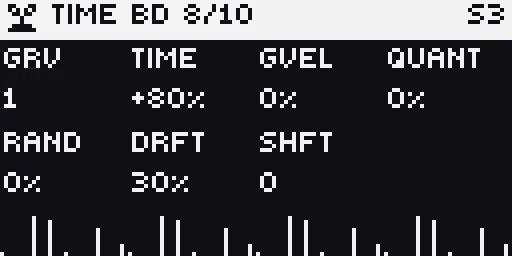
| Knob | Name | Values | Default | Shown |
|---|---|---|---|---|
| A | GRV | OFF, 1 … the number of grooves built in | OFF | always |
| B | TIME | −100…+100 % | +100 % | while a groove is chosen |
| C | GVEL | −100…+100 % | 0 % | while a groove is chosen |
| D | QUANT | 0–100 % | 0 % | always |
| E | RAND | 0–100 % | 0 % | always |
| F | DRFT | 0–100 % | 0 % | always |
| G | SHFT | −63…+63 steps | 0 | while a groove is chosen |
Micro timing is counted in 1/24 of a step and limited to ±23, as on the Rytm. A step is taken as a 1/16 whatever the track’s speed. For each trig, in this order:
- QUANT pulls the micro timing the trig already has towards the grid: 100 % puts it on the grid.
- The groove adds its offset for that step, times TIME (negative reverses it). SHFT moves the groove against the pattern by that many steps.
- GVEL scales the velocity by the groove’s velocity at that step: at +100 % a step where the groove is at half its loudest gets half its velocity; negative values work the other way round.
- RAND adds a random offset, up to ±23 at 100 %. It draws from the seed, so it changes with SEED.
- DRFT adds the drift (below).
Only trigs change; steps without a trig are not touched.
The grooves
Section titled “The grooves”GRV’s number picks a groove; its name shows on the strip while the knob turns. The firmware you build from the repository has five MPC-style swing amounts: SWING 54, SWING 58, SWING 62, SWING 66 and SWING 71. A build made with grooves from your own Ableton Live installation has those instead (Building: your own grooves).
DRFT: drifting micro timing
Section titled “DRFT: drifting micro timing”DRFT moves the trigs’ micro timing along a slow curve: neighbouring steps are early or late together, and the curve wanders from ahead of the beat to behind it and back over the track, as a player who rushes for a while and then drags. RAND gives every trig its own offset; DRFT gives offsets that belong together.
- DRFT is the largest drift, as a share of the ±23 range. Most steps sit well inside it: at 100 % the average drift is about ±8, and the largest values come where the curve’s layers agree.
- The curve belongs to the steps, not the trigs: changing DENS, SYNC or MASK does not change the drift a step gets, only which steps have a trig to carry it.
- It is a sum of smooth layers with a new value every 2, 4, 8, 16 and 32 steps; a layer is used when it is shorter than the track (a 16-step track has three, a 64-step track five). It wraps at the track’s length, so the loop has no jump. A track of one or two steps does not drift.
- SEED and VARY. Another seed gives another curve; with VARY, consecutive takes drift in related ways. Raising DRFT scales the same curve: no step changes direction.
- On SRC = TRACK, DRFT adds to the micro timing the trigs already have.
The scale of DRFT is as built in 0.7; beta feedback may change it before 1.0.