Concepts
This page explains the ideas every page of Trig Seedr shares. The pages themselves follow in on-screen order, from TAKE to TOOLS; every knob is listed in the knob reference, every key and message in Keys and messages.
Opening and the screen
Section titled “Opening and the screen”Trig Seedr is a third page behind the TRIG key: TRIG (stock’s TRIG page), TRIG (EUCLIDEAN), TRIG (Trig Seedr), TRIG again back to stock’s TRIG page. TRIG held + PAGE opens it from anywhere. It closes with TRIG, a parameter page key (SRC, SMPL, FLTR, AMP, LFO, FX), a menu key, or NO when no take is pending. It opens on the page you left; the first time, on TAKE.
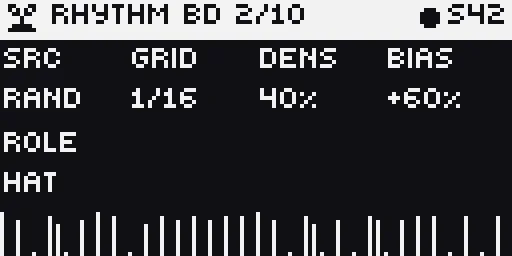
| Part | What it shows |
|---|---|
| Title bar | the page, the track, the page’s place among the pages shown (2/10); at the right the source: TRK (the track’s own trigs), EUC (EUCLID), CPY (COPY), MAP (MAP with CHAOS below 4), or S and the seed for a source that draws random numbers. A dot before it (● S42) means a take is playing that is not applied yet. The place is left out when the title would not fit |
| Body | up to eight knobs, A–H, in two rows of four: a label and its value |
| Strip | the preview: the take YES would write. Messages replace it for 2 seconds |
LEFT / RIGHT step through the pages: TAKE, RHYTHM, PLACE, DYNAMICS, NOTE, LOCK, TRIG, TIME, VIEW, TOOLS, and round again. PAGE, the TRIG keys and the transport keep their stock jobs: PAGE still picks which 16 steps the TRIG keys show, so you can see and edit every page of a take while Trig Seedr is open.
Recipe and take
Section titled “Recipe and take”Every track has a recipe: the settings of all its pages. A take is the recipe rendered from the track as it was before your first YES (the original). Every YES renders the whole recipe from the original again, so takes never pile up on each other, and YES does the same on every page.
The recipe is rendered in this order. Each page owns its fields: changing one page changes only what that page writes.
| Order | Page | Decides |
|---|---|---|
| 1 | RHYTHM | which steps have trigs (the only page that makes trigs) |
| 2 | PLACE | where they end up: ROT, then SYNC, MASK and SKIP |
| 3 | DYNAMICS | velocity and the accent flag |
| 4 | NOTE | length and note |
| 5 | LOCK | parameter locks on two parameters you choose |
| 6 | TRIG | trig conditions and retrigs |
| 7 | TIME | micro timing; a groove’s velocity scales DYNAMICS’ velocity |
| last | PLACE’s FLD | one field rotated against the trigs |
A page at 0 leaves its fields alone. A share at 0 %, a range at DEF or a mode at OFF writes nothing. With SRC = TRACK and every page at 0, YES changes nothing.
A new recipe protects your trigs. A track that has trigs starts on SRC = TRACK: its own trigs, which the other pages then shape. An empty track starts on SRC = RAND. The recipe is made when Trig Seedr first shows the track and is kept after that: a track that was empty then stays on RAND after you record trigs into it. A new recipe takes METR and BEAT from the last recipe you generated, so a pattern in 6/8 stays in 6/8 as you move between tracks.
Recipes are kept in memory, for the pattern in play. Changing pattern starts new recipes for every track, and power off forgets them. What a take wrote is ordinary pattern data and is saved with the project as usual.
Per track, and shared
Section titled “Per track, and shared”| Kept | Settings |
|---|---|
| per track (the recipe) | every knob of TAKE to TIME, except MAP’s X, Y and CHAOS; both lock lanes’ parameters |
| shared by all tracks | MAP’s X, Y and CHAOS: turning X on BD’s page turns it for SD too |
| Trig Seedr’s own | TOOLS’ knobs (TOOL, STEPS, WILD, ROLL), the page you are on, the lock lane in view, VIEW’s cursor |
Tracks Trig Seedr does not write
Section titled “Tracks Trig Seedr does not write”- The FX track. YES says NOT ON THE FX TRACK and writes nothing; the strip says the same.
- A track in stock’s Euclidean mode. YES says EUCLID IS ON: TURN IT OFF. Turn EUC off on the EUCLIDEAN page first. TOOLS’ ROTATE ALL skips such tracks.
Generate and apply
Section titled “Generate and apply”Trig Seedr generates a take and you apply it. Generating writes real trigs into the track so you can hear them; the original is kept until you apply the take, and comes back if you don’t.
This is not how the Rytm’s Euclidean mode works. Euclidean mode plays a separate pattern from its own settings, so your stored trigs never change. Trig Seedr has no separate pattern: the sequencer plays the stored trigs, so a take has to be written into them. That is why generating needs grid recording, as any editing of trigs does, and why a take stays only when you apply it.
| You do | RECORD off | RECORD on (grid recording) |
|---|---|---|
| Open Trig Seedr, change page, turn knobs | the strip previews the take; nothing is written | the same |
| YES (generate) | nothing is written; the strip says RECORD TO GENERATE | the take is written and plays; your original is kept; the dot shows |
| YES again, no knob turned | the next seed, from your original | |
| YES after turning a knob | the same seed with your change, from your original | |
| YES after NO or NOT APPLIED, no knob turned | the take you were hearing comes back (the same seed), so FUNC + YES then keeps it. YES once more moves to the next seed | |
| YES after FUNC + YES, no knob turned | the next seed | |
| FUNC + YES (apply) | nothing to apply | the take stays and the original is dropped; the strip says APPLIED. The only way a take stays |
| NO | closes Trig Seedr | the original comes back (BACK TO THE ORIGINAL); with no take pending, NO closes Trig Seedr |
| Change track or pattern, close Trig Seedr, or turn RECORD off, with a take pending | the original comes back; the strip says NOT APPLIED | |
| Save the pattern or the project with a take pending | not from inside Trig Seedr: SCENE and GLOBAL close it first, so the take is not applied. See the known quirk below | |
| Power off with a take pending | the Rytm saves its working state with the take on the track. After power on the take is ordinary pattern data: nothing is pending, and NO does not bring the original back |
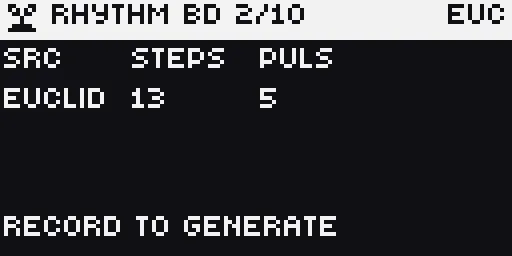
- Nothing is lost by not applying. The recipe and the seed stay, so YES writes the same take again.
- RECORD means grid recording: RECORD lit, the sequencer stopped or playing. Live recording (RECORD + PLAY) does not count.
- A take that cannot be written (for example a lock the pattern has no room for) writes nothing and the strip says why for 2 seconds. See messages.
- TOOLS (ROT ALL and YOLO) follow the same rules, with small differences listed on TOOLS.
Known quirk: YES + SCENE does not save while Trig Seedr is open. Trig Seedr takes the YES as its own (with RECORD on, that YES generates), and SCENE closes Trig Seedr, so a pending take is not applied (NOT APPLIED). The Rytm sees SCENE without YES, so the pattern is not saved. To save a take: FUNC + YES, close Trig Seedr, then YES + SCENE.
The seed
Section titled “The seed”SEED on TAKE is the take’s number. The same seed, recipe and original give the same take, every
time. YES with no knob turned moves to the next seed (as the table above says), and the title bar shows it as
S and the number.
Each page draws its own random numbers from the seed. So turning COND on TRIG does not change which steps have trigs, and turning DENS does not change the velocities that trigs already had.
With SRC = TRACK, EUCLID, COPY, or MAP with CHAOS below 4, the trig positions draw no random numbers: the title bar
shows TRK, EUC, CPY or MAP in place of the seed. The seed still decides the random values the later pages
draw (a velocity range, conditions, locks, random micro timing).
VARY (on TAKE) relates consecutive seeds: at 0 % every seed is unrelated, at 100 % every seed gives the same take, and in between the next seed keeps that share of the take’s random choices.
Share knobs
Section titled “Share knobs”DENS, SYNC, ACC, COND, RTRG and a lock lane’s % pick a share of the trigs. Each step gets a key from the seed, and the knob takes the steps with the highest keys. Raising a share keeps every step it had already chosen and adds more; lowering it removes them in reverse. Turning a share up and down moves through one family of takes. (With QUAL above 1 this holds for each candidate, but another candidate can win: see QUAL.)
Range knobs
Section titled “Range knobs”VEL, LEN and NOTE, a lane’s RNGE, and TRIG’s CVAL and RATE are ranges: each value is drawn between a low and a high end.
- The knob sets the high end, FUNC + knob the low end. Each end moves only with its own control and stops where it meets the other: the high end never goes below the low end, nor the low end above the high end.
- DEF. VEL, LEN and NOTE start at DEF: the field is left as it is. The first turn up sets both ends to a starting value (VEL 100, LEN 1/16, NOTE +0). Turning either end below the knob’s lowest value goes back to DEF.
- A range too wide for its cell shows its low end and
+(60+); while you turn it, the strip shows it in full for 2 seconds.
FUNC + knob also turns SEED in steps of 100, and every other knob with more than 20 values in steps of 10.
Hidden knobs
Section titled “Hidden knobs”A knob is not shown while it cannot change the take with the present settings. A hidden knob keeps its value and comes back with its row.
| Knob | Shown while |
|---|---|
| TAKE PHRS | the track is longer than 16 steps |
| TAKE CVAR, QUAL | the trig positions come from the seed: SRC = RAND, MAP with CHAOS 4 or more, or SYNC above 0 |
| RHYTHM GRID, DENS, BIAS, ROLE; STEPS, PULS; PART, DENS, X, Y, CHAOS; TRK | their source is chosen on SRC |
| RHYTHM ROLE | BIAS is not 0 |
| PLACE MTRK | MASK is not OFF |
| PLACE FROT, FMOD | FLD is not OFF |
| DYNAMICS AMT | SHAPE is not FLAT |
| DYNAMICS N | SHAPE is EVRY or NOISE |
| DYNAMICS AMOD | ACC is above 0 |
| NOTE ORDR, NLEN; LOCK ORDR, LLEN | the source is LIST |
| NOTE ZOOM; LOCK ZOOM | the source is NOISE |
| TRIG CTYP | COND is above 0 |
| TRIG CVAL | COND is above 0 and CTYP is X%, A:B or MIX |
| TRIG RATE, RCUR | RTRG is above 0 |
| TIME TIME, GVEL, SHFT | a groove is chosen (GRV is not OFF) |
| TOOLS STEPS; WILD, ROLL | TOOL is ROT ALL; TOOL is YOLO |
On the FX track the pages show only the knobs for fields the FX track has (micro timing and trig conditions), and YES does not write there.
The preview strip
Section titled “The preview strip”The strip at the bottom of every page except VIEW shows the take YES would write on the track in view: one bar per step, 2 pixels apart, its height the trig’s velocity (a trig at the track’s default velocity uses that default). An empty step on every fourth step has a dot. A track of 64 steps fills the screen’s width.
- A knob turn shows its result at once, before YES. Nothing is written until YES.
- While a take is pending, the strip renders from the original, as the next YES will, not from the take that plays. Turn a knob and the strip shows the next take while the current one keeps playing.
- After YES the strip and the track are the same take. After NO or NOT APPLIED, the strip shows the take YES brings back.
- Trigs recorded with the TRIG keys while Trig Seedr is open change the original; with SRC = TRACK the strip follows them. COPY and MASK read the other track as it is now, so the strip follows that track too.
- With RECORD off the strip still previews the take.
When YES would write nothing, the strip says why in place of the bars: NOT ON THE FX TRACK, EUCLID IS ON: TURN IT OFF, or the recipe’s error. A lock the pattern has no room for is found only at YES (NO LOCK ROWS LEFT).