VIEW
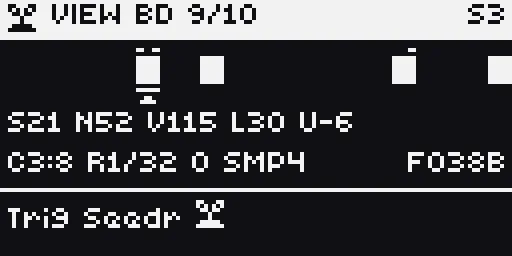
VIEW shows the track’s steps as they are, read only; while a take is pending, the take. Knob A moves the cursor. VIEW has the “Trig Seedr” footer in place of the preview strip.
| Knob | Name | Values | Default | Shown |
|---|---|---|---|---|
| A | STEP | 1 … the track’s length (the cursor) | 1 | always |
The top row shows the 16 steps of the cursor’s page:
| Mark | Meaning |
|---|---|
| tall box | a trig |
| small box | a trig with the SYN, SMP and ENV switches all off |
| hollow box | a muted trig |
| line under the box | the accent flag |
| short line over the box, left | a retrig |
| short line over the box, right | a lock on lane 1 or lane 2 |
| arrow under the step | the cursor |
Below it, for the step under the cursor:
| Text | Meaning |
|---|---|
S21 |
the step |
N52 V115 L30 |
note, velocity, length code (-: the track’s default) |
U-6 |
micro timing, in 1/24 of a step |
C3:8 |
trig condition (-: none) |
R1/32 0 |
retrig rate and velocity curve (-: no retrig) |
SMP4 |
each lane’s lock: its parameter’s name and value (only when the step has one) |
F038B |
the step’s flag word, in hex: 0x0001 trig, 0x0002 retrig, 0x0004 mute, 0x0008 accent, 0x0010 swing, 0x0020 slide, 0x0080 / 0x0100 / 0x0200 SYN / SMP / ENV on |
DN DV |
the track’s default note and velocity |
When the lock values fill the line, the defaults are left out first, then the flag word.